Here are 50+ ready-to-use ChatGPT prompts, organized by category — work, business, marketing, content creation, SEO, research, productivity, email, and learning. Copy any prompt, swap in your own details where marked, and paste it directly into ChatGPT.
Let's get straight into it.
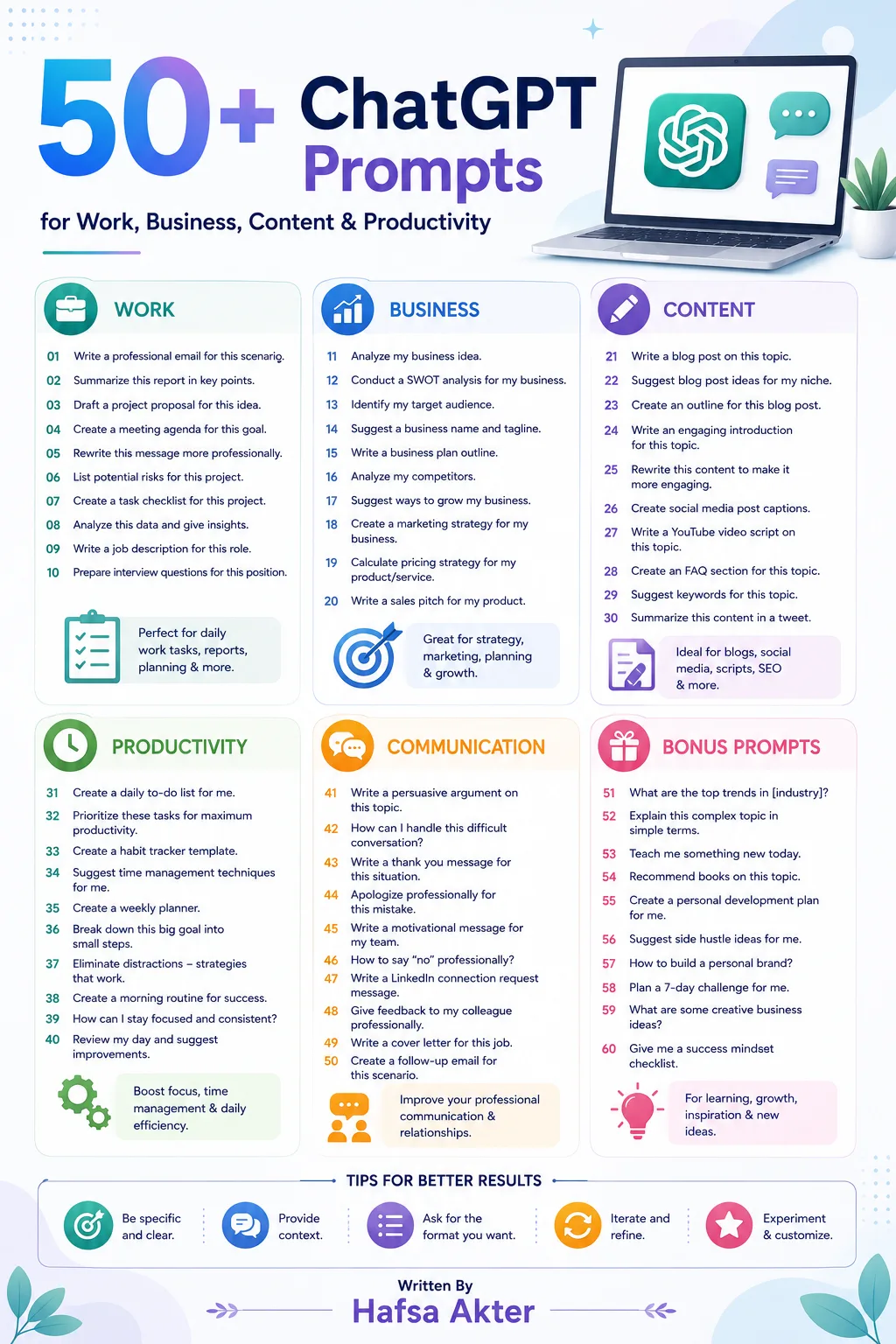
You already know what makes a prompt work, and you've learned the techniques behind strong ones. Now let's make this practical. Below is a library of prompts you can actually use today, across nearly every task you're likely to hand ChatGPT. Just replace the bracketed parts with your own details.
Work & Office
- "Summarize this meeting transcript into key decisions, action items, and owners: [paste transcript]."
- "Draft a professional email to my manager requesting [specific request], keeping it under 100 words."
- "Turn these rough notes into a clear, organized report: [paste notes]."
- "Write a one-paragraph project update for my team, covering progress, blockers, and next steps."
- "Create a checklist for onboarding a new employee into the [department] team."
- "Rewrite this message to sound more professional without changing the meaning: [paste message]."
Business
- "Give me a quick market overview for [industry/product] targeting [audience]."
- "List five ways [type of business] could reduce operating costs without cutting quality."
- "Write a short business proposal outline for [project idea]."
- "Draft a polite follow-up message to a client who hasn't responded in a week."
- "Summarize the pros and cons of expanding [business] into [new market/product line]."
- "Create a simple SWOT analysis for [business idea]."
Marketing
- "Brainstorm 10 marketing campaign ideas for [product], targeting [audience]."
- "Write three different taglines for [product/brand]."
- "Suggest five content ideas to promote [product] for the upcoming [season/event]."
- "Write a short product launch announcement for [product], in an exciting but professional tone."
- "Give me five ways to re-engage inactive email subscribers for [business type]."
- "Compare two possible marketing angles for [product]: [angle 1] vs [angle 2]."
Content Creation
- "Write a 1,000-word blog post outline about [topic], targeting [audience]."
- "Draft a LinkedIn post about [topic], with a strong hook in the first line."
- "Write five Instagram caption options for a post about [topic/product]."
- "Turn this blog post into a short Twitter/X thread: [paste content]."
- "Write a YouTube video script outline about [topic], structured as hook, main points, and closing call-to-action."
- "Repurpose this article into three separate social media posts: [paste article]."
SEO
- "Suggest 10 keyword ideas related to [topic], including a mix of short and long-tail keywords."
- "Write an SEO-friendly title and meta description for a page about [topic]."
- "Create a content outline for [topic] that would target search intent for beginners."
- "Suggest three internal linking opportunities between these two articles: [paste both topics/summaries]."
- "Review this content and suggest where keywords could be placed more naturally: [paste content]."
- "Write five FAQ questions and answers for a page about [topic], based on how people commonly search for it."
Research
- "Give me a summary of the current landscape around [topic], including key trends."
- "Compare [option A] and [option B] across cost, quality, and ease of use."
- "Summarize this article in three bullet points: [paste article]."
- "List the main arguments for and against [topic/decision]."
- "Explain [complex topic] in simple terms, as if I have no background in it."
- "What questions should I ask before deciding on [decision/purchase]?"
Productivity
- "Help me plan my day based on these priorities: [list tasks]."
- "Turn this messy list of tasks into an organized, prioritized to-do list: [paste tasks]."
- "Suggest a weekly schedule that balances [work commitments] with [personal goals]."
- "Break down this large task into smaller, manageable steps: [describe task]."
- "Give me three tips to stay focused while working on [type of task]."
- "Help me plan a realistic timeline for completing [project] by [deadline]."
Email & Communication
- "Write a polite email declining [request], while keeping the relationship positive."
- "Draft a follow-up email after a meeting about [topic], summarizing next steps."
- "Write a short, friendly email introducing myself to [type of contact]."
- "Turn these bullet points into a clear, professional email: [paste bullet points]."
- "Write an apology email for [situation], keeping the tone sincere but concise."
- "Draft a message asking a colleague for help with [task], in a friendly, low-pressure tone."
Learning
- "Explain [topic] as if I'm a complete beginner, using a simple analogy."
- "Create a 7-day study plan for learning the basics of [subject]."
- "Quiz me on [topic] with five multiple-choice questions."
- "Summarize [book/topic] into the five most important takeaways."
- "Explain the difference between [concept A] and [concept B] in plain language."
- "Break down [complex process] into a simple step-by-step explanation."
How to Get the Most Out of These Prompts
A quick reminder before you start copying and pasting: these work best as starting points, not final answers.
- Replace every bracketed section with your real details
- Add context about your specific situation where it helps
- Use the "ask, review, refine" approach from our first guide to adjust the output
- Combine two prompts together if your task needs both — for example, research plus content creation
The prompt gets you started. The follow-up is what makes it actually useful.
What's Next?
You've now got a working library you can return to anytime. But ready-to-use prompts only take you so far — for tasks that need more precision and reliability, it helps to go a level deeper.
In the next guide, we'll cover 10 ChatGPT Prompting Techniques That Actually Work in 2026.
Frequently Asked Questions
Can I use these ChatGPT prompts for free?
Yes — all of these work on both the free and paid versions of ChatGPT. Some longer or more complex prompts may perform better on paid plans with more advanced models.
Do I need to copy these prompts exactly?
Not at all. Treat them as templates — adjust the wording, add more context, or combine a couple together to fit exactly what you need.
Which ChatGPT prompts are best for beginners?
Start with the Productivity and Learning categories — they tend to be the simplest to adapt and show quick, useful results right away.
Can these prompts be used for business use cases too?
Yes, the Business, Marketing, and SEO categories are built specifically with business and professional use in mind.
How do I make these prompts more specific to my situation?
Add real details in place of the brackets — your industry, audience, tone preference, or constraints. The more specific your input, the more useful the output.
Connect with me on LinkedIn for more guides like this.