Advanced ChatGPT automation means moving past single prompts into repeatable, multi-step processes — connecting ChatGPT to tools, apps, and data so it can research, analyze, write, and organize with less input from you each time. It's the bridge between using ChatGPT as a chatbot and using it as a true AI agent.
Let's walk through what that actually looks like, and where all of this is heading.
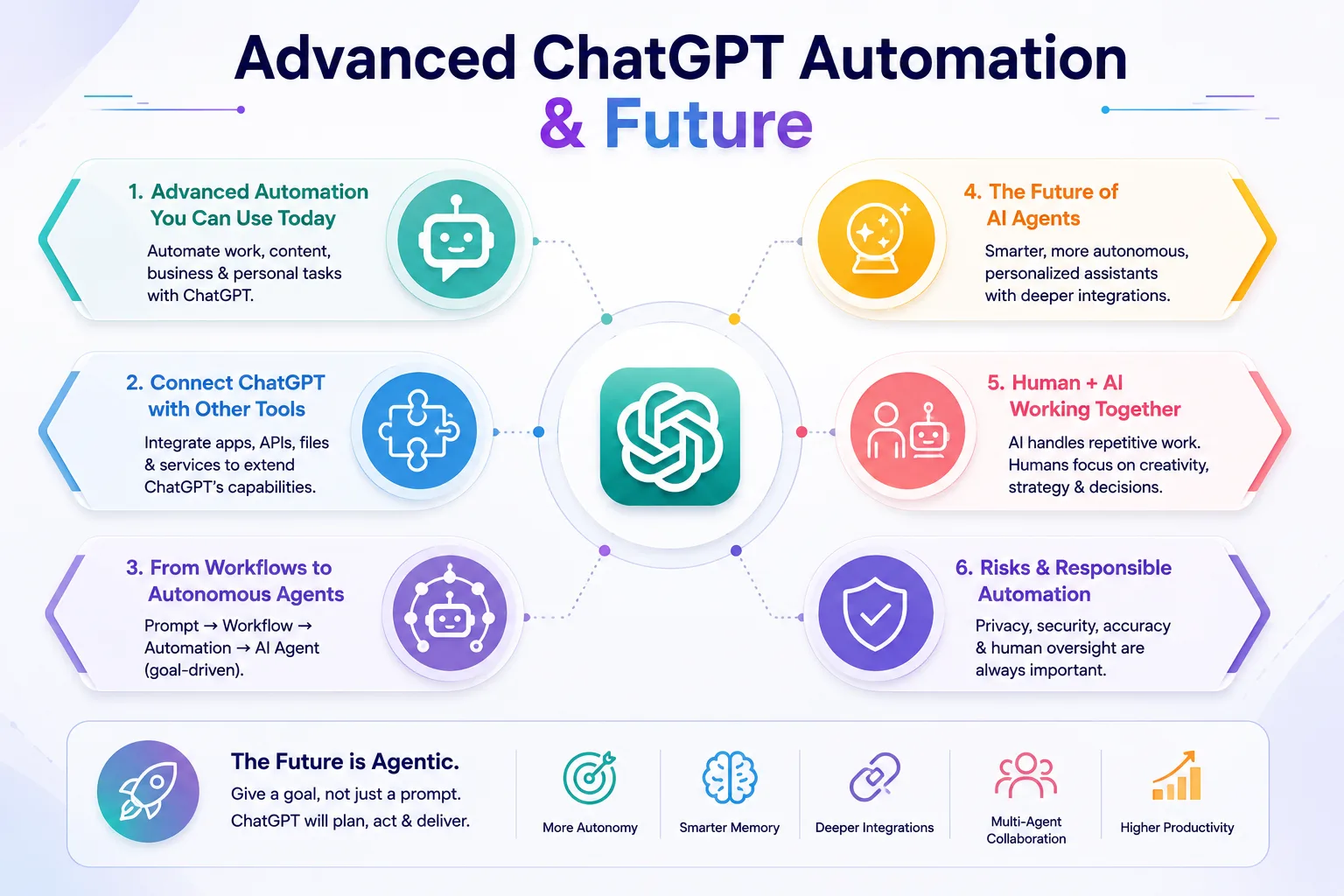
There's a shift happening that's easy to miss if you're not paying attention. It used to be that you asked ChatGPT a question. Now, increasingly, you give it a task. That small difference — from asking to assigning — is really what this whole article is about: automation, AI agents, multi-step tasks, and where personal AI assistants are actually headed.
What Is Advanced ChatGPT Automation?
Let's separate a few terms that often get blurred together.
Basic prompting is one question, one answer. You type, it responds, done. Automation is different — it's a repeatable process, not a one-time exchange. Instead of solving a task once, you build a sequence that handles it the same way every time it comes up.
That usually means combining ChatGPT with other tools and integrations, so it's not working in isolation.
A simple example of what this looks like in practice:
Research → Analyze → Write → Review → Organize
Each step feeds into the next. That's the core idea behind advanced automation — not one clever prompt, but a working process.
Advanced ChatGPT Automation You Can Use Today
Here's where this actually shows up in everyday use, across a few different areas.
Work automation — drafting emails, generating reports, summarizing meetings, running through data analysis.
Content automation — moving from research to outline to draft to optimization in one connected flow, repurposing one piece of content into several formats, and handling social content in batches.
Business automation — researching leads, drafting customer responses, managing follow-ups, and processing documents without doing each one manually.
Personal automation — planning your schedule, researching decisions, organizing travel, and structuring your own learning.
None of these need to be reinvented every time. Once the process works, you just run it again.
Connecting ChatGPT to Other Tools
Here's the part that actually makes automation possible — ChatGPT doesn't have to work alone.
It can connect to APIs, other apps and integrations, files and databases, web-based tools, and external services and automation platforms. That connection is what turns a conversation into an actual working system.
A simple way to think about it:
ChatGPT = the brain
Tools = the hands
Data = the memory
Workflow = the process
On its own, ChatGPT can think and respond. Connected to the right tools, it can actually act.
From Workflows to Autonomous Agents
This is really the key idea in this whole article, so let's slow down here.
There's a clear progression happening, and it looks like this:
Prompt → Workflow → Automation → AI Agent
A prompt is you asking, and ChatGPT answering. A workflow is a predefined sequence of steps you walk through. Automation is that same sequence running without you manually triggering each part. And an AI agent is a step further still — you give it a goal, and it decides the steps itself, rather than following a script you laid out in advance.
That last distinction matters a lot, and it's worth understanding properly — we covered it in more depth in our earlier guide, What Is an AI Agent?, if you want the fuller picture.
The Future of ChatGPT as a Personal AI Agent
A few trends are already becoming clear, and they point in a fairly consistent direction:
- More autonomous task execution, with less step-by-step guidance needed
- Better memory that holds context over longer periods
- Deeper integration with the apps you already use
- More personalized assistance, shaped around your specific habits
- Multiple agents collaborating on different parts of a task
- More proactive assistance — acting before you ask, not just after
- Smarter decision-making within the tasks it's handling
- The ability to manage entire workflows, start to finish, not just individual steps
None of this is far off theory — most of it is already showing up in early form right now.
Will AI Agents Replace Human Work?
This is the question everyone eventually asks, so let's answer it honestly instead of dodging it.
AI will likely handle: repetitive tasks, data processing, routine communication, research, and administrative work — the kind of tasks that are structured and predictable.
Humans will remain essential for: judgment, creativity, strategy, relationships, complex decisions, and accountability — the kind of work that depends on context, values, and trust.
The most accurate way to put it: AI won't simply replace work — it will change how work gets done. Historically, automation tends to eliminate specific tasks within a job far more often than it eliminates the entire job itself. Roles shift and specialize rather than disappearing outright — though that transition isn't always smooth, and it's worth taking seriously rather than dismissing.
Risks of Advanced Automation
It's worth being honest about the downsides too, not just the upside.
- Privacy — automation often needs access to sensitive personal or business data
- Security — connected systems create more points where something could go wrong
- Incorrect actions — a mistake in an automated process can repeat itself before anyone notices
- Over-automation — not everything benefits from being automated
- Loss of human oversight — the more hands-off a system becomes, the easier it is to stop checking it
- AI hallucinations — confident but incorrect output is still a real risk, even in automated systems
- Over-permissioning — giving an agent more access than a task actually requires
None of this means avoid automation. It means build it carefully, with real oversight in place.
How to Prepare for the AI-Agent Future
A few practical steps that genuinely help, starting today:
- Learn how to write clear, specific prompts
- Understand how workflows are actually structured
- Start by automating your most repetitive tasks first
- Get comfortable with a few core AI tools
- Keep humans involved in decisions that actually matter
- Review your automated processes regularly, rather than setting and forgetting
Final Thoughts
ChatGPT is evolving from something you talk to, into something you can work with — and increasingly, something that can work for you.
If you've followed this series from the start, here's the journey in one line:
Understand → Configure → Use → Automate → Scale → Adapt
That's the whole arc — from learning what a personal AI agent even is, to actually building automation and workflows around your real, everyday work.
Frequently Asked Questions
Will AI agents replace human jobs?
Not entirely — most evidence points to AI agents replacing specific tasks within jobs rather than entire roles. Jobs are more likely to shift and specialize than disappear completely.
What is the difference between ChatGPT automation and an AI agent?
Automation runs a predefined sequence of steps you've already set up. An AI agent goes further — you give it a goal, and it decides the steps itself, adjusting along the way.
Can ChatGPT automate tasks without coding?
Yes. Most automation described here works through plain-language setup, Projects, and integrations — no programming knowledge required for the core use cases.
Can ChatGPT connect to other apps and tools?
Yes, through APIs, integrations, and connected platforms, which is what allows it to move from just answering questions to actually completing tasks across different systems.
What will personal AI assistants look like in the future?
Expect more autonomous task handling, better long-term memory, deeper app integration, and more proactive assistance — acting ahead of your request rather than only after it.
Is it safe to give an AI agent full access to my accounts or data?
Not without caution. It's safer to start with limited permissions, expand access gradually, and keep human review in place for anything sensitive or high-stakes.
Connect with me on LinkedIn for more guides like this.