To get more accurate and reliable results from ChatGPT, give it reference material to work from instead of relying on memory, explicitly ask it to admit uncertainty rather than guess, request verification or self-review before the final answer, and break complex tasks into smaller connected prompts. These methods directly reduce the made-up, overconfident answers known as hallucinations.
Let's go through exactly how.
By now, you know how to write a solid prompt, and you know the core techniques. This guide goes one level deeper — for the tasks where accuracy actually matters, and a confidently wrong answer could genuinely cost you something. Let's walk through it properly.
Why ChatGPT Sometimes Gets Things Confidently Wrong
Quick bit of context before the techniques. ChatGPT doesn't "know" facts the way a database does — it predicts the most likely next word based on patterns it learned. Most of the time, that pattern lines up with reality. Sometimes it doesn't, and the model still states it with full confidence. That's what people mean by a "hallucination."
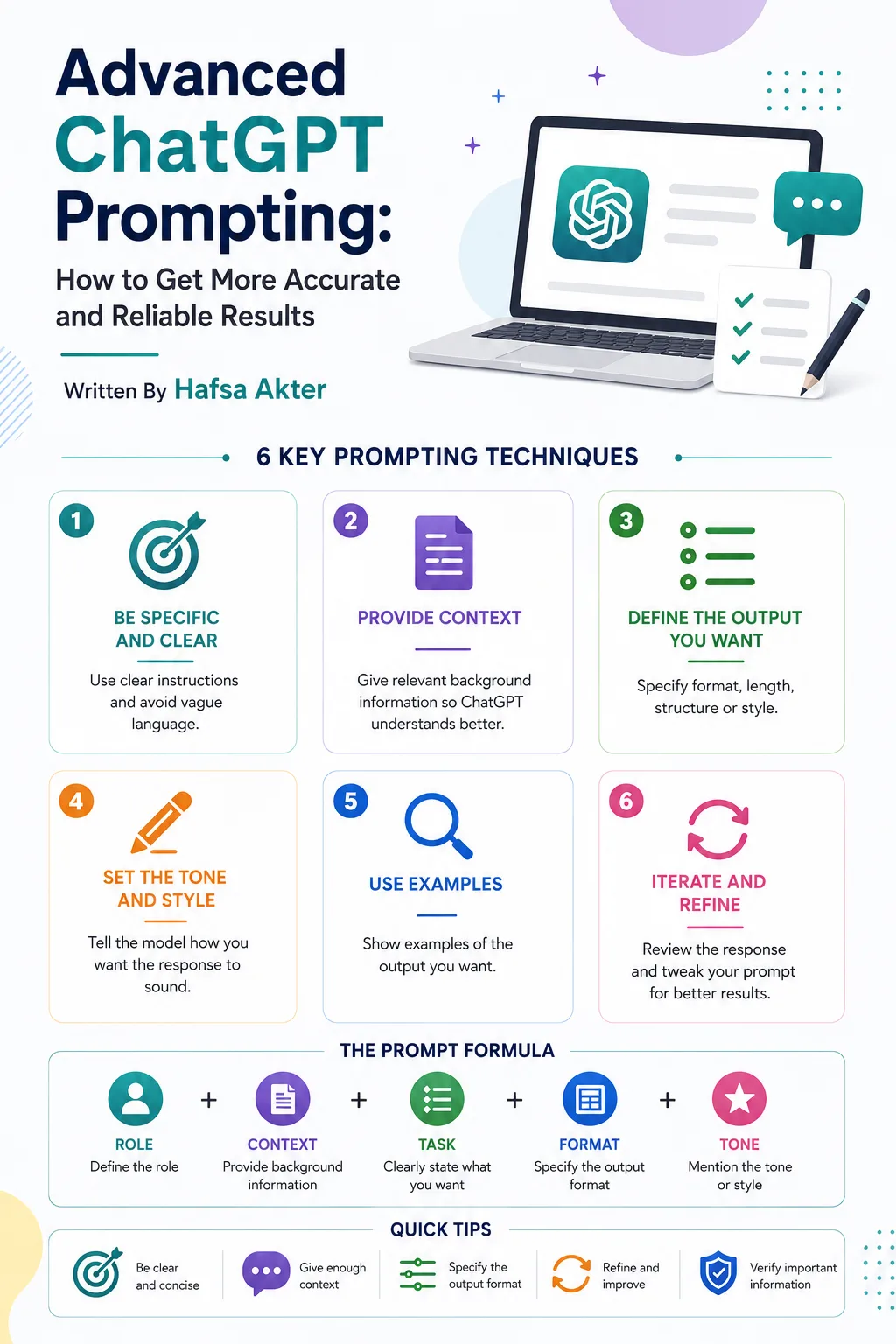
The good news: how you prompt it has a real, measurable effect on how often this happens. Let's get into the specific methods.
Handling Complex Instructions
For anything with several requirements at once, spell each one out clearly rather than bundling them into one vague sentence.
Weak: "Write something good about our product for social media."
Better: "Write a LinkedIn post about our product, under 150 words, professional but warm in tone, ending with a question to encourage comments."
Complex instructions work best when they read like a checklist ChatGPT can follow, not a single loose idea.
Multi-Step Tasks
For anything with multiple stages, don't cram it all into one prompt. Walk through it the same way you'd walk a new employee through a big project — one clear stage at a time, checking the output before moving to the next.
Example flow:
- "First, outline the sections of this report."
- "Now write the introduction based on that outline."
- "Now write the analysis section, using this data: [paste data]."
Each step builds on the one before it, and you get to catch and correct issues early instead of untangling them at the end.
Structured Outputs
When precision matters, tell ChatGPT exactly what shape the answer should take.
Example: "Give me the answer as a table with three columns: Option, Pros, Cons." Or: "Respond only in valid JSON with these fields: name, category, price."
Structured formats aren't just cosmetic — they force the response into a shape that's much easier to check for gaps or errors.
Giving Reference Material
This might be the single most effective accuracy technique on this whole list: don't rely on ChatGPT's memory for anything important — give it the actual source material.
Example: "Using only the information in this document, answer the following question: [paste document, then your question]."
When ChatGPT is working from text you gave it, rather than guessing from training data, the odds of it inventing something drop sharply.
Asking ChatGPT to Verify
You can directly ask it to check its own work before handing you the final version.
Example: "Before giving your final answer, list any assumptions you made and flag anything you're not fully certain about."
This one small addition surfaces a lot of hidden guesswork that would otherwise be presented as fact.
Handling Ambiguity
If a request could reasonably be interpreted more than one way, ask ChatGPT to flag that instead of quietly picking one interpretation.
Example: "If anything in my request is unclear or could mean more than one thing, ask me a clarifying question before answering."
This is a small addition that saves you from getting a confident answer to the wrong question.
Reducing Hallucinations
Let's bring this together into a few direct, high-impact instructions you can add to almost any prompt where accuracy matters:
- Give it permission to say "I don't know." Add: "If you're not sure, say so clearly instead of guessing."
- Ask for sources or reasoning. Add: "Explain your reasoning" or "note where this information would typically come from."
- Separate fact from assumption. Add: "Clearly separate what's confirmed from what you're inferring."
- Keep instructions clear, not just stylistic. One useful, current finding: adding a persona purely for style (like "act as an expert") without real context can actually hurt factual accuracy, because it nudges the model toward sounding confident rather than being correct. Save role prompting for tone and style tasks — for accuracy-critical tasks, clear, specific instructions matter more than a persona.
Used together, these consistently produce more careful, more honest answers.
Self-Critique
Similar to verification, but focused specifically on catching mistakes before you see the final version.
Example: "Review your answer for any factual errors, unclear statements, or unsupported claims, then revise it."
This works because reviewing is a genuinely different task from generating — asking for both, one after another, catches things a single pass tends to miss.
Prompt Chaining
For your most complex or high-stakes tasks, chain several focused prompts together rather than expecting one message to do everything.
Example chain:
- "Research the key considerations for [decision]."
- "Now compare the top three options based on that research."
- "Now write a final recommendation, based on the comparison, and note any remaining uncertainty."
Each link in the chain is small enough to check, which makes the whole process far more reliable than one giant, all-in-one request.
Putting It All Together
You don't need to apply every technique here to every prompt — that would be overkill for a quick, low-stakes question. Save these for the tasks where accuracy genuinely matters: research you'll act on, content you're publishing, decisions with real consequences.
For everyday quick tasks, the basics from our earlier guides are usually enough.
What's Next?
You now know how to get more reliable results out of ChatGPT. The next step is turning your best prompts into templates you can reuse instantly, instead of rebuilding them from scratch every time.
In the next guide, we'll cover ChatGPT Prompt Templates: 25 Reusable Prompts for Everyday Tasks.
Frequently Asked Questions
Why does ChatGPT sometimes give confident but wrong answers?
Because it predicts likely text based on patterns rather than checking a factual database. When the pattern looks right, it states it — even if the underlying fact is incorrect.
How can I reduce ChatGPT hallucinations?
Give it reference material to work from, explicitly ask it to admit uncertainty instead of guessing, request that it verify or review its own answer, and avoid vague, ambiguous prompts.
Does asking ChatGPT to "think step by step" reduce mistakes?
It can help, especially on multi-step reasoning tasks, by forcing intermediate steps instead of jumping straight to an answer. It's less necessary on newer reasoning-enabled models that already do this internally.
Does giving ChatGPT a role or persona improve accuracy?
Not necessarily. Persona prompts help with tone and style, but recent findings suggest they can slightly reduce factual accuracy if used without real context. For accuracy-critical tasks, clear instructions matter more than a persona.
What is prompt chaining, and when should I use it?
It's breaking a large or complex task into smaller connected prompts, where each output feeds the next step. Use it for high-stakes or multi-part tasks where getting it right matters more than getting it fast.
Connect with me on LinkedIn for more guides like this.