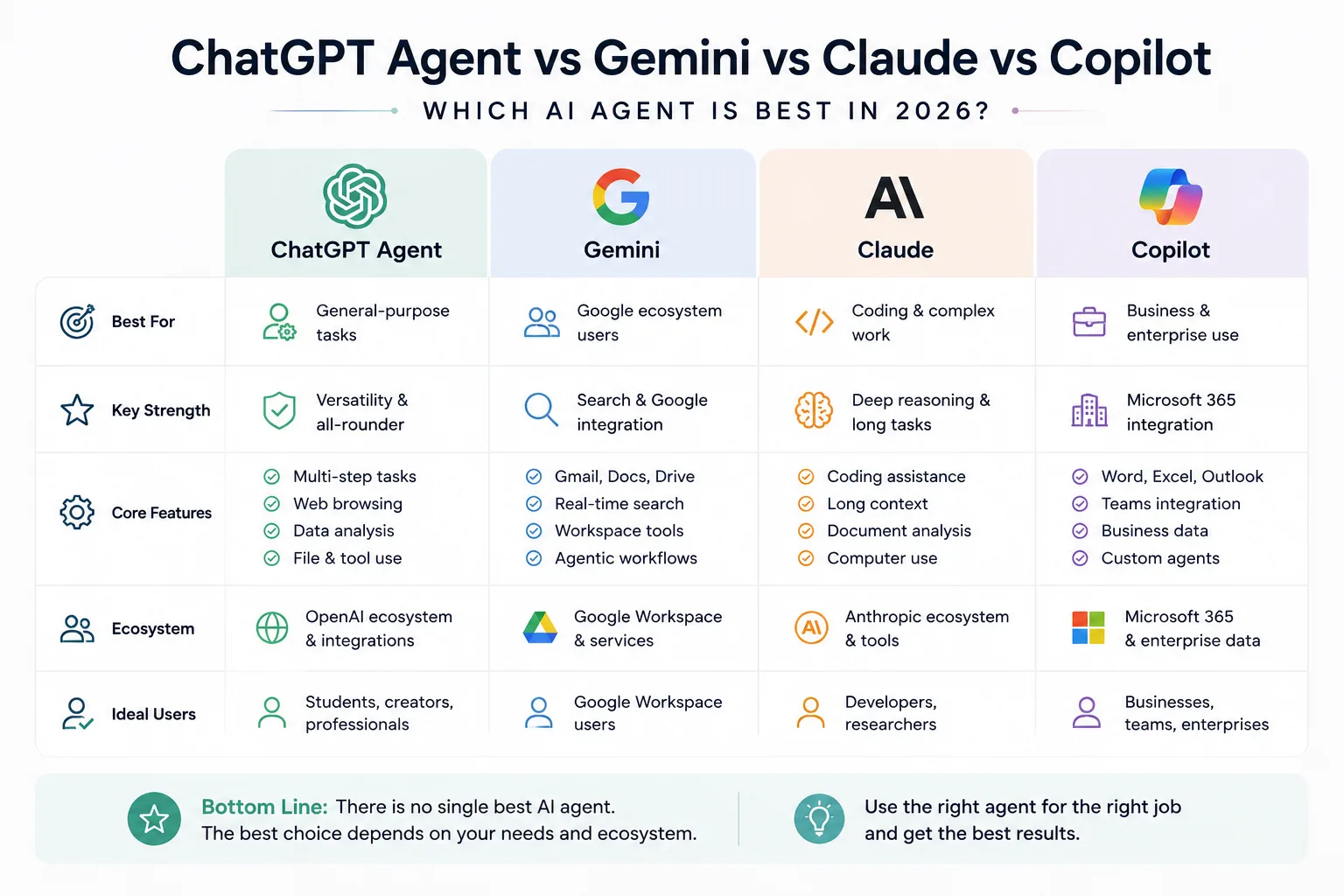
There's no single "best" AI agent in 2026 — ChatGPT Agent works best as a flexible all-rounder, Gemini is strongest if you live inside Google's apps, Claude leads on coding and complex, long-running work, and Copilot is the natural choice if your company runs on Microsoft 365. The right pick depends on what you need the agent to actually do.
Let me walk you through why, one tool at a time.
Here's something worth thinking about. Give the exact same task to four different AI agents:
"Research my competitors, summarize what you find, and create a report."
You'd expect a similar result, right? In practice, you won't get one. Each of these tools — ChatGPT Agent, Gemini, Claude, and Microsoft Copilot — approaches that task a little differently, because each one is built around a different strength.
So this isn't just another chatbot comparison. It's a practical look at how these four actually behave as agents, and which one fits your specific situation.
What Actually Makes Something an "AI Agent"?
Before comparing these four, let's quickly settle what separates an agent from a regular chatbot — because that difference is the whole point of this article.
A regular chat model reasons and responds. An agent goes further: it can use tools, work through several steps on its own, and act with a level of autonomy — sometimes asking for your approval along the way, sometimes not.
If you want the fuller breakdown of this distinction, we covered it in detail in our earlier guide, AI Agent vs Chatbot vs ChatGPT. For now, just keep this in mind: the more of these traits a tool has — reasoning, tool use, multi-step execution, autonomy — the more it earns the label "agent" rather than just "chatbot."
With that settled, let's look at each one.
ChatGPT Agent — Best for General-Purpose Tasks
ChatGPT's agent capabilities have grown into something genuinely broad. It can carry out multi-step tasks on its own, do web research, interact with a browser, work with files you give it, analyze data, and connect to other apps and services you're already using.
What stands out here isn't one single killer feature — it's the range. You can hand it almost any kind of task, and it'll find a reasonable way to approach it.
Best for: People who want one flexible agent that can handle different kinds of work, without needing a specialized tool for every task.
One honest note — OpenAI's agent features and naming have shifted a few times as the technology has evolved, so it's always worth double-checking the current feature set before you rely on something specific.
Gemini — Best for the Google Ecosystem
Gemini's biggest strength isn't really about raw model power — it's about where it lives. If your day already runs through Gmail, Docs, Search, and the rest of Google Workspace, Gemini fits directly into that world instead of asking you to switch context.
Google has also been pushing Gemini toward more proactive, agentic behavior — not just answering when you ask, but taking action inside your existing workflow. That combination of ecosystem plus action is really what makes it stand out.
Best for: People and teams who are already heavily invested in Google's apps and services.
Claude — Best for Coding and Complex Work
Claude, built by Anthropic, has built a real reputation around one thing in particular: handling complex, long-running, detail-heavy work well.
That shows up clearly in coding — Claude consistently performs strongly on demanding, multi-step coding tasks, long documents, and deep research. It's also built with computer-use and agentic coding capabilities, meaning it can work through a task over an extended session rather than just answering one message at a time.
Best for: Developers, researchers, and professionals who regularly deal with complex reasoning, long documents, or serious coding work.
Microsoft Copilot — Best for Business
Copilot's entire value proposition is baked into one thing: how deeply it sits inside Microsoft 365. Word, Excel, Outlook, Teams — Copilot works directly where a huge number of businesses already operate every day.
Beyond that, Microsoft's agent ecosystem now lets Copilot-based agents connect to a company's own knowledge sources, external services, APIs, and existing business workflows. So it's not just drafting documents — it's increasingly built to plug into how a business actually runs.
Best for: Businesses already running on Microsoft 365, especially teams heavily inside Word, Excel, Outlook, or Teams.
Quick Comparison
Let's keep this simple instead of cramming it into a table.
ChatGPT Agent — best for general-purpose tasks; its strength is versatility.
Gemini — best for Google users; its strength is deep ecosystem integration.
Claude — best for coding and complex work; its strength is reasoning and handling long tasks.
Copilot — best for businesses; its strength is Microsoft 365 integration.
So, Which One Should You Actually Choose?
This is really the question that matters. Let's break it down by situation.
Choose ChatGPT if you want an all-rounder, you handle a mix of different task types, and you want flexible agent workflows without committing to one ecosystem.
Choose Gemini if you're already living inside Gmail and Docs daily, and search or the wider Google ecosystem genuinely matters to your work.
Choose Claude if coding is a real part of your work, you deal with complex documents or reasoning-heavy tasks, and you regularly run longer, professional-grade projects.
Choose Copilot if your company runs on Microsoft 365, and you spend most of your day inside Word, Excel, Outlook, or Teams.
Do You Have to Pick Just One?
Here's something worth saying clearly: you don't actually have to choose only one of these.
A lot of people — and businesses — end up using more than one, each for what it does best. A fairly common setup looks like this:
- Claude for coding work
- ChatGPT for research and general everyday tasks
- Gemini for anything inside Google Workspace
- Copilot for Microsoft-based business workflows
This is honestly more realistic than picking one "winner" and forcing every task through it. Different jobs, different strengths — use whichever tool actually fits the task in front of you.
Finally
There is no single best AI agent in 2026. The right choice really does depend on what you want the agent to do, and which ecosystem you're already working inside.
If you want it simplified into one line each:
- Best all-rounder → ChatGPT
- Best for the Google ecosystem → Gemini
- Best for complex or coding work → Claude
- Best for Microsoft business workflows → Copilot
Pick based on your actual day-to-day work, not based on which name gets talked about the most.
Frequently Asked Questions
Which AI agent is best overall in 2026?
There isn't one universal winner — ChatGPT is the strongest general-purpose all-rounder, but Gemini, Claude, and Copilot each lead in their own specific area, depending on your ecosystem and task type.
Is Claude better than ChatGPT for coding?
For complex, long-running, or heavily reasoning-based coding tasks, Claude is generally considered the stronger choice. ChatGPT remains a strong, flexible option for general coding help and everyday tasks.
Should I use Gemini or ChatGPT if I use Google Workspace?
Gemini is the more natural fit if you're deeply embedded in Gmail, Docs, and the wider Google ecosystem, since it integrates directly into those tools rather than working alongside them.
Is Microsoft Copilot only useful for businesses?
It's built primarily around Microsoft 365, so it delivers the most value for people and teams already working in Word, Excel, Outlook, or Teams — individuals outside that ecosystem may find less benefit.
Can I use more than one AI agent at the same time?
Yes, and many people do. A common approach is using Claude for coding, ChatGPT for general research, Gemini for Google Workspace tasks, and Copilot for Microsoft-based business work.
Do these AI agents work fully on their own, without any human input?
Not entirely. Most of them still involve some level of human review or approval for important actions, rather than running completely unsupervised from start to finish.
Connect with me on LinkedIn for more breakdowns like this.