AI workflow automation is a repeatable process where AI handles tasks that need understanding (reading, sorting, summarizing, drafting) and automation software passes the results between your apps. Humans review the sensitive steps.
Most of us lose hours every week to work that doesn't need a human brain. Sorting emails. Copying details between apps. Summarizing long documents. That's why more teams are adopting AI workflow automation: software takes the repetitive parts, and people focus on decisions.
In this guide, you'll learn how it works, where it's used, what it does well, and where it falls short.
What Is AI Workflow Automation?
AI workflow automation is a connected process in which AI interprets information and automation software acts on it, usually with a human check at the end.
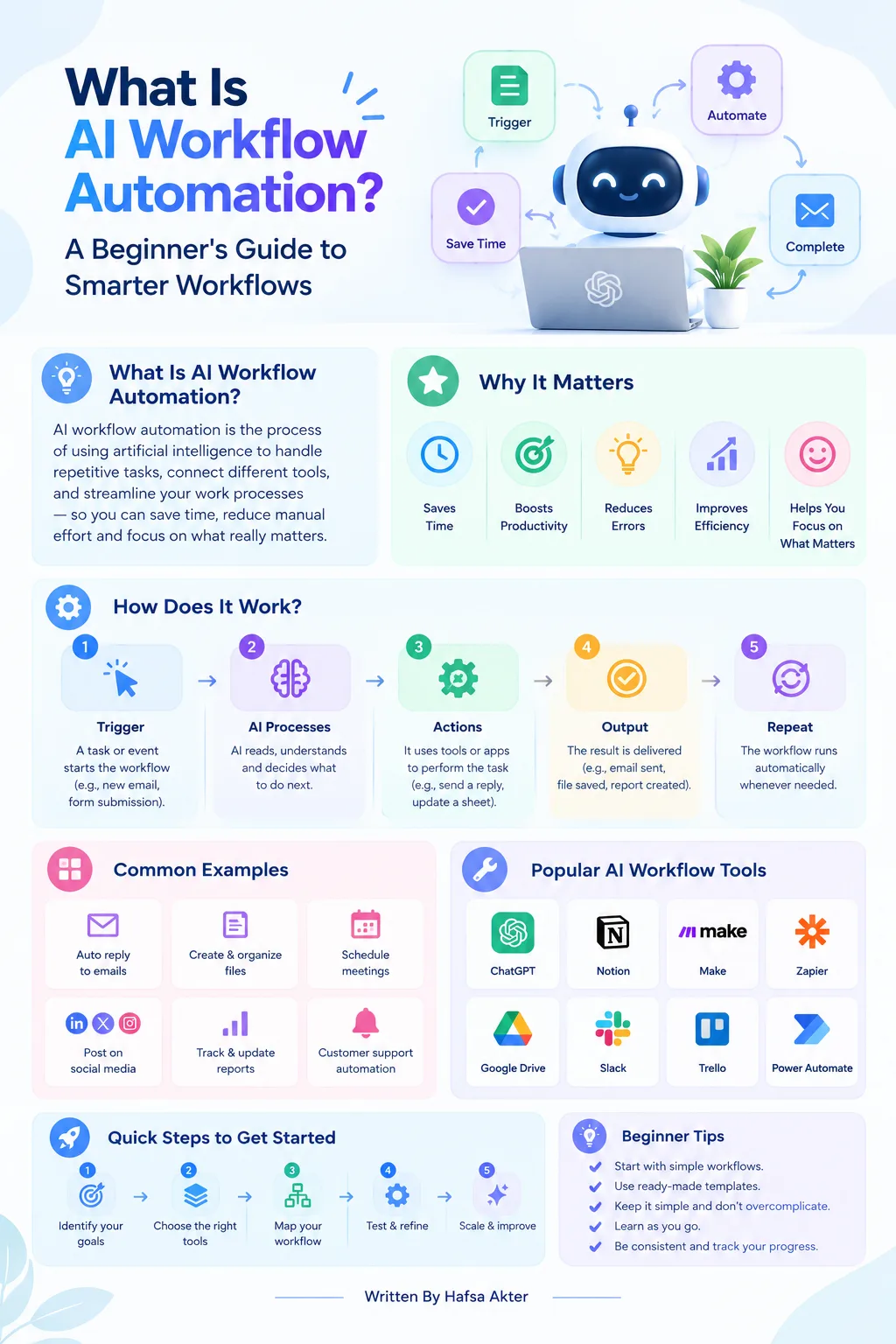
- AI can read an email, summarize a document, classify a request, or draft a reply.
- Automation software takes that output and does something with it, like updating a spreadsheet or alerting a teammate.
- It's a process, not a single tool.
- ChatGPT alone isn't a workflow. ChatGPT plus a trigger, connected apps, and a review step is.
How Does AI Workflow Automation Work?
An AI workflow runs in up to five stages: a trigger starts it, information is collected, AI processes it, rules send the result to the right place, and a person reviews the output.
- Trigger: A new email, form submission, or uploaded file starts the process.
- Input: The workflow collects the relevant information.
- AI processing: The AI analyzes, classifies, summarizes, or generates content.
- Rules and actions: The result is routed somewhere or updates a connected app.
- Review and feedback: Someone checks the output, fixes errors, and improves the setup.
Not every workflow needs all five. Sensitive or high-impact actions, like emailing a client, should get human approval first.
What Is the Difference Between AI Automation and Traditional Automation?
Traditional automation follows fixed rules. AI workflow automation can interpret content and make a judgment call within limits you set.
Take a contact form submission:
- Traditional automation: Sends a standard "Thanks, we got your message" email. Nothing more.
- AI workflow automation: Reads the message, works out what the person wants, tags the request, drafts a reply, and sends it to a team member for approval.
When should you use AI?
- When the information is messy, like free-text emails or long documents.
- When a task needs interpretation, not just a rule.
- Skip it for simple, predictable tasks. Regular automation is often enough.
What Are Common Uses of AI Workflow Automation?
Common uses include content creation, customer support, lead management, and routine admin tasks. Here's a quick look at each.
1. Marketing and Content Creation
- Research assistance and content summaries
- First-draft generation
- Distributing content across channels
2. Customer Support
- Sorting questions by topic or urgency
- Suggesting replies
- Passing complex cases to a support person
3. Sales and Lead Management
- Organizing new leads
- Summarizing customer inquiries
- Updating CRM records
4. Administrative and Business Tasks
- Pulling key details out of documents
- Summarizing reports
- Organizing routine tasks
We'll cover more real-world AI workflow examples in a separate guide.
What Are the Benefits of AI Workflow Automation?
The main benefit is less repetitive work, which frees people for creative and strategic tasks.
- Less manual, repetitive work
- Faster handling of routine tasks
- More consistent results from one run to the next
- Better handling of text and document-based information
- More time for creative work and decision-making
One caveat. Results depend on workflow design, data quality, how reliable your integrations are, and how closely people supervise it.
What Are the Limitations of AI Workflow Automation?
The main limitations are inaccurate output, privacy risks, setup complexity, ongoing upkeep, and cost.
- Wrong answers: AI can produce incorrect or misleading output, sometimes with total confidence.
- Privacy and security: Sending customer or company data through AI tools needs care.
- Setup complexity: Connecting apps can be fiddly, and integrations sometimes break.
- Ongoing upkeep: Workflows need monitoring and occasional fixes.
- Costs: Software subscriptions, AI usage fees, and setup time add up.
Before you scale, test the outputs, limit access, validate results, and keep a human in the loop.
Is AI Workflow Automation Right for Beginners?
Yes, if you start with one small, repetitive task that has clear inputs and a clear expected result.
- Pick a single process, not your whole business.
- Try no-code platforms, which let you build simple workflows without programming.
- Test the output before letting automation take any consequential action.
Want the step-by-step version? Our next guide shows you how to build an AI workflow.
Frequently Asked Questions
What is AI workflow automation in simple terms?
- It's a process where AI handles tasks that need understanding, like reading or summarizing.
- Automation software then passes the results between your apps.
- Together, they take repetitive work off your plate.
How does AI workflow automation work?
- A trigger starts the process and information is collected.
- AI analyzes or generates something.
- Rules route the result to the right app or person.
- A human reviews it, especially for sensitive steps.
What is the difference between AI automation and traditional automation?
- Traditional automation follows fixed rules, like sending a standard confirmation email.
- AI automation can interpret content, such as a customer's message, and respond to it.
- AI works best on unstructured or judgment-based tasks.
Do you need coding skills to use AI workflow automation?
- Not always. Many no-code platforms offer drag-and-drop builders for simple workflows.
- Complex or custom setups may still need some technical help.
What are some examples of AI workflow automation?
- Sorting customer support queries
- Summarizing documents and reports
- Organizing sales leads
- Drafting content
- Extracting details from forms
Each one pairs an AI task with an automated action.
Is AI workflow automation suitable for small businesses?
- Yes, especially for time-consuming routine tasks.
- Start with one process, test it carefully, then expand gradually.
- Check costs and data privacy before you commit.
AI workflow automation combines what AI can understand with the repeatable, connected steps of automation. Start with one small process, measure whether it actually saves time, and keep people involved where mistakes would matter.
Hafsa Akter writes about digital marketing and AI. Connect on LinkedIn or read her newsletter, Insights by Hafsa.