Common AI workflow automation examples include support ticket sorting, email drafting, lead qualification, invoice processing, meeting summaries, and weekly planning. Each one pairs a trigger, an AI task, an automated action, and a human review step for anything sensitive.
Most of us have a pile of small, repetitive tasks that eat the day. AI can link those tasks into one smooth process.
Some of these examples are simple, like an AI-drafted email. Others are multi-step processes across connected apps. Here are ten you can use as inspiration. New to the topic? Start with what AI workflow automation is.
What Makes a Good AI Workflow Automation Example?
A good example has a clear task, usable input data, an AI step, and a measurable result.
- A defined task with repeatable steps
- Input data the AI can work with
- An AI task like classifying, summarizing, extracting, or generating
- Rules, integrations, and human review where needed
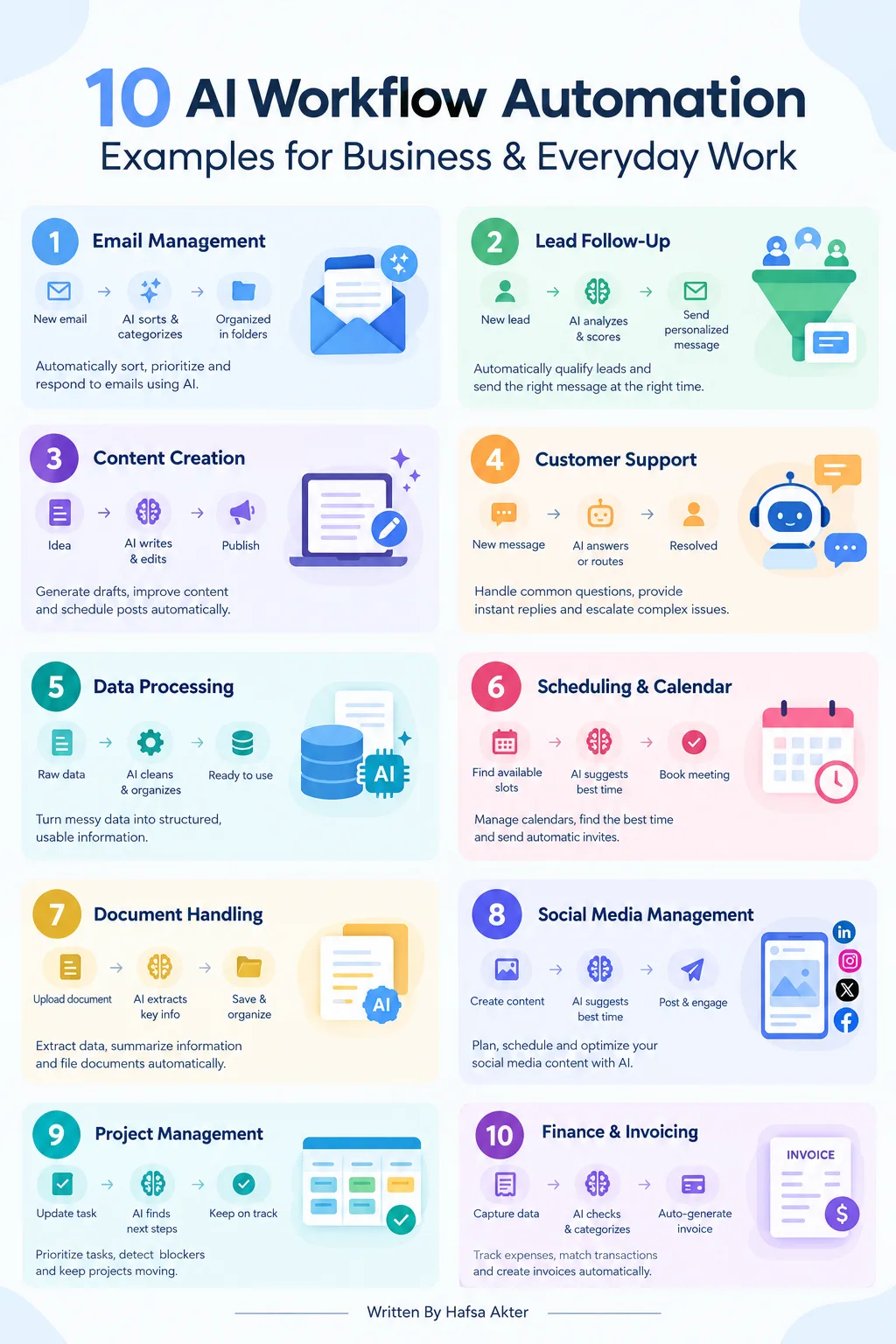
What Are 10 Practical AI Workflow Automation Examples?
Here are ten, each with a trigger, an AI task, an action, and a review step.
1. Customer Support Ticket Management
- Trigger: A new support request arrives.
- AI task: Classify the issue and set its priority.
- Action: Route the ticket to the right team.
- Human review: Flag sensitive or unclear cases.
2. Email Sorting and Response Drafting
- Trigger: A new email lands in the inbox.
- AI task: Categorize it and summarize the request.
- Action: Draft a reply.
- Human review: Approve before sending.
3. Content Research and Creation
- Trigger: A new topic is added to your content list.
- AI task: Organize research notes, then generate an outline and draft.
- Action: Send the draft to the editor.
- Human review: Fact-check and edit before publishing.
4. Social Media Content Scheduling
- Trigger: A piece of content gets approved.
- AI task: Turn it into platform-specific drafts and captions.
- Action: Build a publishing calendar and schedule posts through supported tools.
- Human review: Approve the posts first.
5. Lead Qualification and Sales Follow-Up
- Trigger: A new inquiry comes in through a form.
- AI task: Pull out key details and sort the lead by your criteria.
- Action: Update a supported CRM and prepare a follow-up draft.
- Human review: A salesperson checks the draft.
6. Invoice and Document Processing
- Trigger: An invoice or document is uploaded.
- AI task: Extract fields and check for missing information.
- Action: Send clean records onward.
- Human review: Route exceptions to a person before any financial record is updated or payment approved.
7. Meeting Notes and Action Items
- Trigger: A meeting ends and the transcript is saved.
- AI task: Summarize it and pick out decisions, owners, and deadlines.
- Action: Prepare follow-up tasks.
- Human review: Confirm the tasks before assigning them.
8. Research and Report Generation
- Trigger: A weekly schedule or a new request.
- AI task: Collect information from approved sources and summarize the findings.
- Action: Build a consistent report.
- Human review: Verify facts and source links before sharing.
9. E-commerce Order and Customer Updates
- Trigger: An order status changes.
- AI task: Prepare a customer notification for that stage.
- Action: Send updates through supported integrations.
- Human review: Escalate delivery problems or unusual requests.
10. Personal Task and Weekly Planning
- Trigger: The start of the week.
- AI task: Organize tasks, deadlines, and priorities into a plan.
- Action: Generate reminders and progress summaries with supported apps or scheduling features.
- Human review: You adjust the plan.
Want to build one? Follow our guide on how to build an AI workflow. Prefer a ready-made starting point? Try ChatGPT workflows.
What Are the Benefits of These AI Workflow Automations?
Well-chosen workflows cut repetitive work, improve consistency, and free up time.
- Less repetitive manual work
- More consistent routine processes
- Faster handling of information
- Easier management of larger request volumes
- More time for work that needs human judgment
Results depend on how you implement it, how good your data is, and how well you monitor it.
How Do You Choose the Right Workflow to Automate First?
Pick a frequent, low-risk task with clear inputs and outputs, then test it small.
- Find a task that's frequent and time-consuming.
- Choose a low-risk process with clear inputs and outputs.
- Estimate the time and cost it takes now.
- Test a small version before expanding.
- Track error rates, time saved, and ongoing costs.
Not sure which software to use? Compare the best AI workflow automation tools.
What Mistakes Should You Avoid?
The big ones are automating unclear processes, trusting output blindly, ignoring privacy, removing oversight, and judging only by speed.
- Automating a process that isn't clearly defined
- Trusting AI output without checking it
- Ignoring privacy and access permissions
- Removing human oversight from sensitive tasks
- Measuring success by speed instead of quality
Frequently Asked Questions
What are some examples of AI workflow automation?
- Sorting support tickets
- Drafting email replies
- Qualifying sales leads
- Extracting data from invoices
- Summarizing meetings
- Planning your week
How is AI workflow automation used in business?
- It handles repeatable tasks in support, sales, marketing, finance, and operations.
- AI interprets the information, and connected apps carry out the next step.
- People review anything sensitive or high-impact.
What tasks can AI automate in everyday work?
- Sorting and summarizing emails
- Writing first drafts
- Organizing notes and action items
- Building weekly plans and reminders
Can small businesses use AI workflow automation?
- Yes, especially for time-consuming routine tasks.
- Start with one process and expand slowly.
- Check costs and data privacy first.
Which tools are used to automate AI workflows?
- No-code platforms like Zapier and Make
- Technical options like n8n
- Microsoft-focused tools like Power Automate
- ChatGPT or similar models for the AI step
How do you measure the success of an AI workflow?
- Track time saved and error rates.
- Watch ongoing costs.
- Check output quality, not just speed.
- Collect feedback from the people using the results.
AI workflow automation works best on specific, repeatable tasks. Pick one workflow, test it carefully, and expand only once the results are reliable.
Ready to go further? Explore advanced AI workflow automation.
Hafsa Akter writes about digital marketing and AI. Connect on LinkedIn or read her newsletter, Insights by Hafsa.