A ChatGPT workflow is a repeatable process where ChatGPT handles one or more steps of a recurring task, like drafting, summarizing, or sorting. Pick a task, write reusable instructions, test the output, then add scheduling or app connections where they help.
Most of us use ChatGPT one chat at a time. Ask, get an answer, close the tab. Tomorrow, you start from zero.
A workflow fixes that. You set the process up once and reuse it for content, email, research, meetings, and planning. Want the bigger picture first? Read our explainer on AI workflow automation.
What Are ChatGPT Workflows?
ChatGPT workflows are repeatable processes that use ChatGPT for a defined task. They can be manual, connected to other apps, or scheduled.
- Manual: You paste in the input and reuse the same saved instructions every time.
- Connected: An automation tool passes data between ChatGPT and your other apps.
- Scheduled: ChatGPT runs a recurring task at set times, if your plan supports it.
Using ChatGPT doesn't automatically make a workflow automated. A manual routine with good instructions still counts. It just still needs you.
How Do You Create a ChatGPT Workflow?
Choose one repetitive task, define the input and output, write reusable instructions, test the results, and add triggers or scheduling only if you need them.
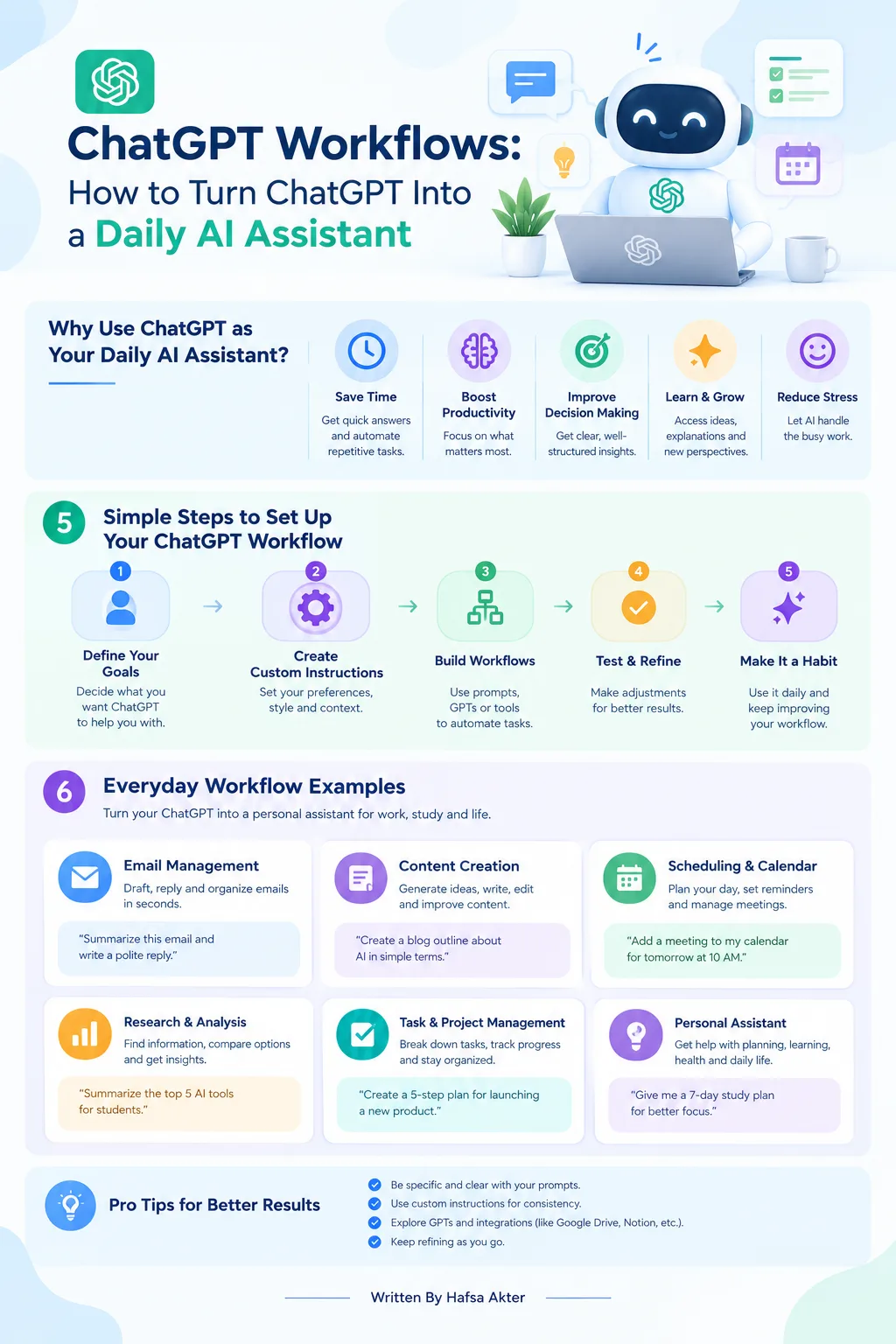
- Pick a task you repeat often.
- Decide what goes in and what should come out.
- Write clear instructions you can reuse.
- Use the right ChatGPT features, or connect a supported automation tool.
- Test the output and fix errors.
- Add scheduling or automatic triggers if they're available and worth it.
For the full process, see our guide on how to build an AI workflow.
What Are Some Practical ChatGPT Workflow Examples?
Good starting points are content drafting, email management, meeting prep, weekly reporting, and daily planning.
1. Content Research and Drafting
- Generate topic ideas and research questions
- Turn your notes into an outline
- Prepare a first draft
- Verify facts and sources before publishing
2. Email Management
- Summarize incoming emails
- Sort messages by topic or priority
- Draft replies for you to review
- Use supported integrations if you want automatic processing
3. Meeting Preparation and Follow-Up
- Organize notes and documents
- Create an agenda or briefing
- Summarize decisions and action items
- Draft follow-up messages for review
4. Research and Weekly Reporting
- Collect information from approved sources
- Summarize the key findings
- Put them into a consistent report format
- Include source links and double-check important claims
5. Daily or Weekly Planning
- Organize tasks, priorities, and deadlines
- Prepare a daily plan or weekly progress summary
- Use scheduled tasks, where available, for recurring reminders or reports
Looking for more ideas? Browse our AI workflow automation examples.
Which Tools Can Help Automate ChatGPT Workflows?
ChatGPT does the thinking, and tools like Zapier connect it to your other apps.
- ChatGPT: Drafting, summarizing, analysis, and supported scheduled tasks.
- Zapier: Linking ChatGPT with supported apps in multi-step automations.
- Other integration platforms: Connecting services through their available triggers and actions.
Your choice depends on integrations, pricing, privacy, and how complex the workflow is. We compare the options in detail in our guide to the best AI workflow automation tools.
What Are the Best Practices for Reliable ChatGPT Workflows?
Give clear instructions, supply context, set the output format, verify facts, protect private data, and keep a human in charge of anything sent or published.
- Write clear, structured instructions
- Provide relevant context and source material
- Specify the output format you want
- Check facts and calculations yourself
- Protect confidential information and review app permissions
- Require approval before sending messages or publishing content
- Review how the workflow performs on a regular basis
What Mistakes Should You Avoid?
The biggest mistakes are expecting actions without integrations, vague prompts, skipping tests, assuming every feature is on every plan, and publishing unchecked content.
- Expecting ChatGPT to act inside other apps without an integration
- Using vague prompts
- Automating a process before testing it
- Assuming every feature is available on every plan
- Publishing generated content without checking accuracy
Frequently Asked Questions
What is a ChatGPT workflow?
- It's a repeatable process that uses ChatGPT for one or more steps of a recurring task.
- It can be manual, connected to other apps, or scheduled.
Can ChatGPT automate repetitive tasks?
- Yes, for tasks like summarizing, sorting, and drafting.
- Full automation usually needs a trigger, connected apps, or scheduling.
- Human review is still smart for important outputs.
Can I connect ChatGPT to other apps?
- Yes, through supported integrations and platforms like Zapier.
- What's available depends on your account, your plan, and the apps involved.
Can ChatGPT run workflows automatically on a schedule?
- Some plans support scheduled tasks for recurring reminders or reports.
- Availability varies, so check what your plan includes.
- Automation platforms can also run workflows on a timer.
Do I need coding skills to create ChatGPT workflows?
- Not for basic ones. Saved instructions and no-code tools go a long way.
- Custom setups using APIs may need some programming.
Is ChatGPT workflow automation free?
- Some features and automation tools have free tiers, usually with limits.
- Higher usage, advanced features, and extra integrations often cost money.
- Your total cost depends on your plan and tools.
ChatGPT workflows turn scattered chats into routines you can repeat. Start with one simple process, test the results, and add integrations or scheduling once it works.
Ready to go further? Explore advanced AI workflow automation.
Hafsa Akter writes about digital marketing and AI. Connect on LinkedIn or read her newsletter, Insights by Hafsa.