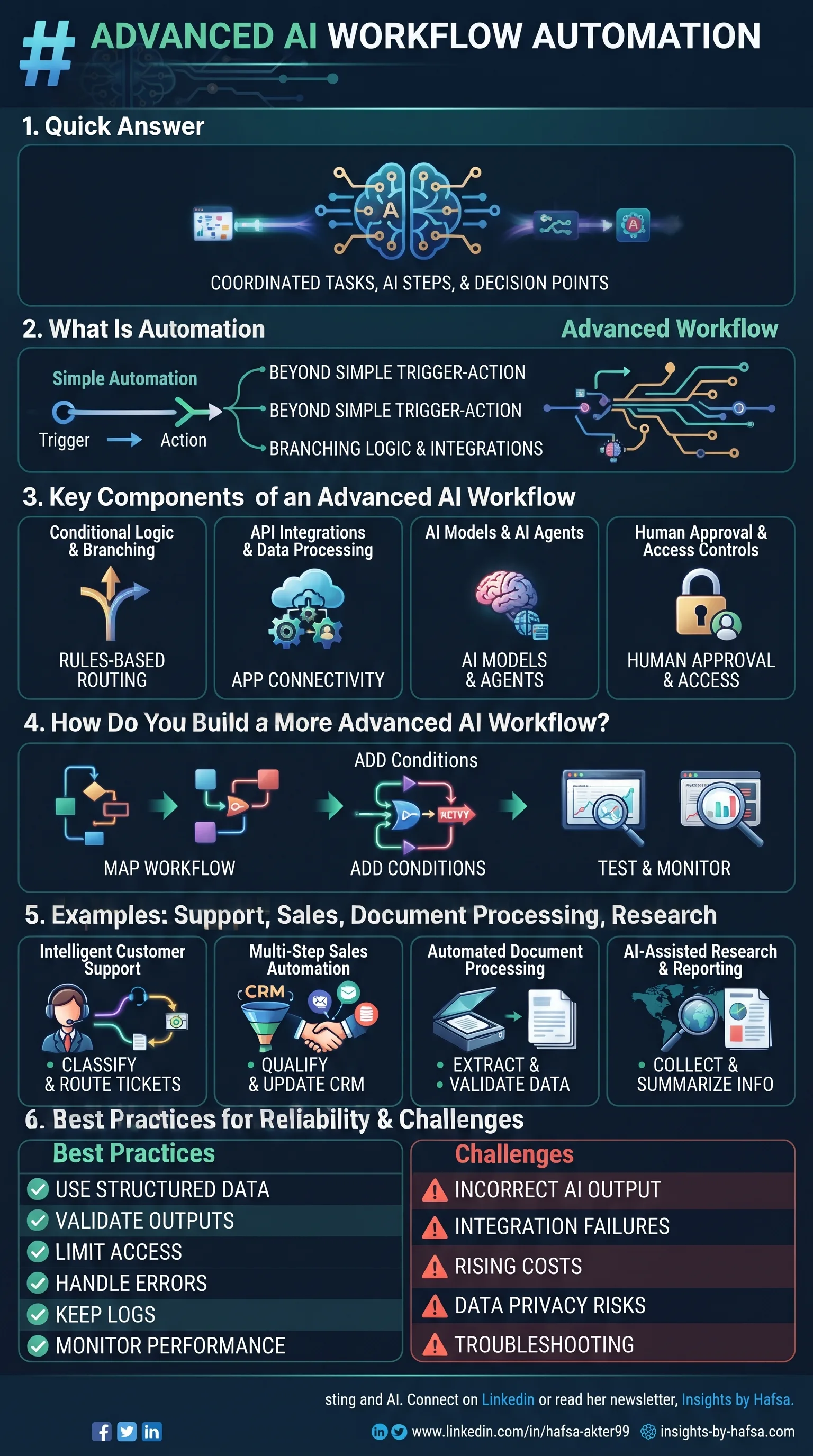
Advanced AI workflow automation coordinates multiple connected tasks, AI steps, and decision points in one process. It goes beyond simple trigger-and-action setups by adding branching logic, API integrations, AI agents, error handling, human approval, and monitoring.
Simple automations work great, until they don't. Add more apps, more exceptions, and more AI steps, and a basic setup starts to crack.
That's where advanced AI workflow automation comes in. It combines multiple steps, decision rules, integrations, and AI. But reliability, control, and monitoring matter as much as the automation itself.
New here? Start with what AI workflow automation is.
What Is Advanced AI Workflow Automation?
It's the coordination of several connected tasks, AI operations, and decision points, instead of one trigger leading to one action.
- It adds conditional paths, so different inputs follow different routes.
- It uses structured data and external integrations.
- It can include AI agents that choose actions within set limits.
- More complexity doesn't automatically mean better results.
A simple, reliable workflow often beats a complicated one you can't troubleshoot.
What Are the Key Components of an Advanced AI Workflow?
The core pieces are conditional logic, API integrations, AI models and agents, and human approval with access controls.
Conditional Logic and Branching
- Routes information differently based on rules, classifications, or conditions.
- Example: urgent tickets go to one team, billing questions to another.
API Integrations and Data Processing
- APIs connect your apps and move information between them.
- They let separate systems work together as one process.
AI Models and AI Agents
- An AI model does one specific job, like classifying or summarizing.
- An AI agent can choose which action to take next, within the permissions and boundaries you set.
- Use agents only where that flexibility is worth the extra risk.
Human Approval and Access Controls
- Sensitive decisions, outside communications, and high-impact actions may need explicit approval.
- Limit what each step can see and do.
How Do You Build a More Advanced AI Workflow?
Map the process, split it into small tasks, add fallbacks, set agent boundaries, then test and monitor.
Step 1: Map the Complete Process
- List the triggers, data sources, decision points, actions, and expected results.
Step 2: Break the Workflow Into Smaller Tasks
- Separate classification, extraction, validation, and execution.
- Test each stage on its own.
Step 3: Add Conditions and Fallback Paths
- Decide what happens when data is missing.
- Decide what happens when an AI response is invalid.
- Decide what happens when an integration fails.
Step 4: Set Boundaries for AI Agents
- Limit the tools and permissions an agent can use.
- Require approval for actions with serious consequences.
Step 5: Test and Monitor the Workflow
- Test normal and unusual inputs.
- Verify the outputs.
- Track errors, costs, and completion rates.
For the basics, see our guide on how to build an AI workflow.
What Are Some Advanced AI Workflow Automation Examples?
Strong examples include support, sales, document processing, and research workflows.
1. Intelligent Customer Support
- Classify the request
- Retrieve approved information
- Draft a response
- Escalate complex cases to a person
2. Multi-Step Sales Automation
- Process incoming leads
- Extract key details
- Check qualification criteria
- Update the CRM and prepare follow-up messages
3. Automated Document Processing
- Extract information
- Validate required fields
- Spot inconsistencies
- Route exceptions for review
4. AI-Assisted Research and Reporting
- Collect information from approved sources
- Summarize findings
- Check references
- Prepare a report for human verification
Want simpler starting points? Browse our practical AI workflow automation examples or try ChatGPT workflows.
What Are the Best Practices for Reliable AI Workflow Automation?
Use structured data, validate outputs, limit access, handle errors, keep logs, and keep watching performance.
- Use structured inputs and outputs
- Validate AI-generated information before any downstream action
- Apply least-privilege access to connected tools
- Add retries and error handling where appropriate
- Keep logs for troubleshooting and auditing
- Monitor quality, latency, usage costs, and failure rates
- Reassess workflows when models, integrations, or business needs change
Remember: a workflow can run perfectly and still deliver a wrong answer. AI output can be incorrect even when every step executes successfully.
What Are the Common Challenges and How Do You Solve Them?
Most problems come down to bad output, broken integrations, rising costs, privacy risks, and hard-to-trace failures.
- Incorrect AI output: Add validation and human review.
- Integration failures: Use error handling and controlled retries.
- Rising operating costs: Track usage and cut unnecessary steps.
- Data privacy risks: Restrict permissions and protect sensitive data.
- Difficult troubleshooting: Log each workflow stage and failure.
Choosing a platform? Compare the best AI workflow automation tools.
Frequently Asked Questions
What is advanced AI workflow automation?
- It coordinates multiple connected tasks, AI steps, and decision points in one process.
- It adds branching, integrations, error handling, and monitoring.
- It may include AI agents working within set limits.
What is the difference between AI automation and AI agents?
- AI automation follows a defined path, with AI handling specific steps.
- An AI agent can decide which action to take next, within its permissions.
- Agents are more flexible but need tighter boundaries and oversight.
How can you make AI workflows more reliable?
- Use structured inputs and outputs.
- Validate AI results before acting on them.
- Add fallbacks, retries, and logs.
- Keep a human in the loop for important actions.
Can advanced AI workflows operate without human supervision?
- Low-risk, well-tested tasks can run with little supervision.
- Sensitive or high-impact actions should still need approval.
- Ongoing monitoring is wise either way.
Which tools support advanced AI workflow automation?
- Platforms like n8n, Make, and Zapier support multi-step logic and AI steps.
- Enterprise options include Workato, UiPath, and Power Automate.
- Capabilities change often, so check each tool's official documentation.
How do you monitor the performance of an AI workflow?
- Track error rates, completion rates, and processing time.
- Watch usage costs.
- Review logs and sample outputs for quality.
- Collect feedback from the people using the results.
Advanced AI workflows bring together AI capabilities, integrations, decision logic, and monitoring. Improve your existing workflows gradually, measure reliability, and keep humans involved where it matters. Don't add complexity for its own sake.
Want to start from the beginning? Revisit what AI workflow automation is.
Hafsa Akter writes about digital marketing and AI. Connect on LinkedIn or read her newsletter, Insights by Hafsa.